• Your hard work restoring The Bell Tree has paid off! A commemorative Shiny Ditto Easter Egg has now appeared in the Shop for 99 Bells.
  • Easter season is here! Here's what we have going on at The Bell Tree:
    • The egg decorating contest is back! Join TBT’s Fifth Egg Decorating Contest, now with two distinct categories: decorating and painting. Entries must be submitted by April 9th.
    • Starting this Friday at 7PM EDT, follow clues to search for eggs around the forum in TBT's Thirteenth Annual Easter Egg Hunt. New eggs will appear throughout the weekend and the hunt ends on April 6th!
    • Customize your profile by spending bells on any of our three recurring backdrops.

Help!

Royce

• I Like Candy •
Joined
Aug 16, 2014
Posts
3,198
Life Coins
22
Eggs
0
Winter Mittens
Winter Mittens
Astral Inner Planet Floating Gold #10
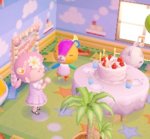
Can someone give me tips on getting that pastel effect for editing Ac screenshots.

PHOTOSHOP LOL SORRY FORGOT..

������
 
Last edited:
I rushed into the thread all ready to help but then I saw your question.... and blanked.... >_< I have failed you...
 
do you have an example of this pastel effect? I'm not too sure what you're talking about
 
image.jpg
Source: cuchuflicito on tumblr.
 
Try going to Image then Adjustments and playing around with the settings there. Like Hue/Saturation or Color Balance. I haven't edited any screencaps myself but that's what I do when I want to adjust my painting's colors and play around with different effects.
 
dunno if this is helpful for you but when you upload pictures to some kind of host, for example imgur, you can choose some effects in editing and it'll be automatic.
 
You're going to want to take an all-one color picture
(such as lavender)
Paste it as a new layer

and play around with the properties of the layer until you get your desired effect.
 
Last edited:
There's an easier way, just email it to yourself or something and use your phone on the app "magic hour" it has a bunch of cute pastel fonts and animal crossing fonts and you can make your own font c:
 
Last edited:
Back
Top